

Connect OpenLLMetry to Elastic APM to visualize LLM traces in Kibana’s native APM interface. This integration uses OpenTelemetry Protocol (OTLP) to route traces from your application through an OpenTelemetry Collector to Elastic APM Server.
This integration requires an OpenTelemetry Collector to route traces between Traceloop OpenLLMetry client and Elastic APM Server. Elastic APM Server 8.x+ supports OTLP natively.

Quick Start

1

Install OpenLLMetry

Install the Traceloop SDK alongside your LLM provider client:
pip install traceloop-sdk openai
2

Configure OpenTelemetry Collector

Configure your OpenTelemetry Collector to receive traces from OpenLLMetry and forward them to APM Server.Create an otel-collector-config.yaml file:
receivers:
  otlp:
    protocols:
      http:
        endpoint: localhost:4318
      grpc:
        endpoint: localhost:4317

processors:
  batch:
    timeout: 10s
    send_batch_size: 1024

  memory_limiter:
    check_interval: 1s
    limit_mib: 512

  resource:
    attributes:
      - key: service.name
        action: upsert
        value: your-service-name # Match this to app_name parameter value when calling Traceloop.init()

exporters:
  # Export to APM Server via OTLP
  otlp/apm:
    endpoint: http://localhost:8200 # APM Server Endpoint
    tls:
      insecure: true # Allow insecure connection from OTEL Collector to APM Server (for demo purposes)
    compression: gzip

  # Logging exporter for debugging (can ignore if not needed)
  logging:
    verbosity: normal # This is the verbosity of the logging
    sampling_initial: 5
    sampling_thereafter: 200

  # Debug exporter to verify trace data
  debug:
    verbosity: detailed
    sampling_initial: 10
    sampling_thereafter: 10

extensions:
  health_check:
    endpoint: localhost:13133 # Endpoint of OpenTelemetry Collector's health check extension

service:
  extensions: [health_check] # Enable health check extension

  pipelines:
    traces:
      receivers: [otlp]
      processors: [memory_limiter, batch, resource]
      exporters: [otlp/apm, logging, debug]

    metrics:
      receivers: [otlp]
      processors: [memory_limiter, batch, resource]
      exporters: [otlp/apm, logging]

    logs:
      receivers: [otlp]
      processors: [memory_limiter, batch, resource]
      exporters: [otlp/apm, logging]
In production, enable TLS and use APM Server secret tokens for authentication. Set tls.insecure: false and configure headers: Authorization: Bearer <token>.
3

Initialize Traceloop

Import and initialize Traceloop before any LLM imports:
from os import getenv

from traceloop.sdk import Traceloop
from openai import OpenAI

# Initialize Traceloop with OTLP endpoint
Traceloop.init(
    app_name="your-service-name",
    api_endpoint="http://localhost:4318"
)

# Traceloop must be initialized before importing the LLM client
# Traceloop instruments the OpenAI client automatically
client = OpenAI(api_key=getenv("OPENAI_API_KEY"))

# Make LLM calls - automatically traced
response = client.chat.completions.create(
    model="gpt-4o-mini",
    messages=[{"role": "user", "content": "Hello!"}]
)
The app_name parameter sets the service name visible in Kibana APM’s service list.
4

View Traces in Kibana

Navigate to Kibana’s APM interface:
  1. Open Kibana at http://localhost:5601
  2. Go to Observability → APM → Services
  3. Click on your service name (e.g., your-service-name)
  4. View transactions and trace timelines with full LLM metadata
Each LLM call appears as a span containing:
  • Model name (gen_ai.request.model)
  • Token usage (gen_ai.usage.input_tokens, gen_ai.usage.output_tokens)
  • Prompts and completions (configurable)
  • Request duration and latency

Environment Variables

Configure OpenLLMetry behavior using environment variables:
VariableDescriptionDefault
TRACELOOP_BASE_URLOpenTelemetry Collector endpointhttp://localhost:4318
TRACELOOP_TRACE_CONTENTCapture prompts/completionstrue
Set TRACELOOP_TRACE_CONTENT=false in production to prevent logging sensitive prompt content.

Using Workflow Decorators

For complex applications with multiple steps, use workflow decorators to create hierarchical traces:
from os import getenv
from traceloop.sdk import Traceloop
from traceloop.sdk.decorators import workflow, task
from openai import OpenAI

Traceloop.init(
  app_name="recipe-service",
  api_endpoint="http://localhost:4318",
)

# Traceloop must be initialized before importing the LLM client
# Traceloop instruments the OpenAI client automatically
client = OpenAI(api_key=getenv("OPENAI_API_KEY"))

@task(name="generate_recipe")
def generate_recipe(dish: str):
    """LLM call - creates a child span"""
    response = client.chat.completions.create(
        model="gpt-4o-mini",
        messages=[
            {"role": "system", "content": "You are a chef."},
            {"role": "user", "content": f"Recipe for {dish}"}
        ]
    )
    return response.choices[0].message.content


@workflow(name="recipe_workflow")
def create_recipe(dish: str, servings: int):
    """Parent workflow - creates the root transaction"""
    recipe = generate_recipe(dish)
    return {"recipe": recipe, "servings": servings}

# Call the workflow
result = create_recipe("pasta carbonara", 4)
In Kibana APM, you’ll see:
  • recipe_workflow.workflow as the parent transaction
  • generate_recipe.task as a child span
  • openai.chat.completions as the LLM API span with full metadata

Example Trace Visualization

Trace View
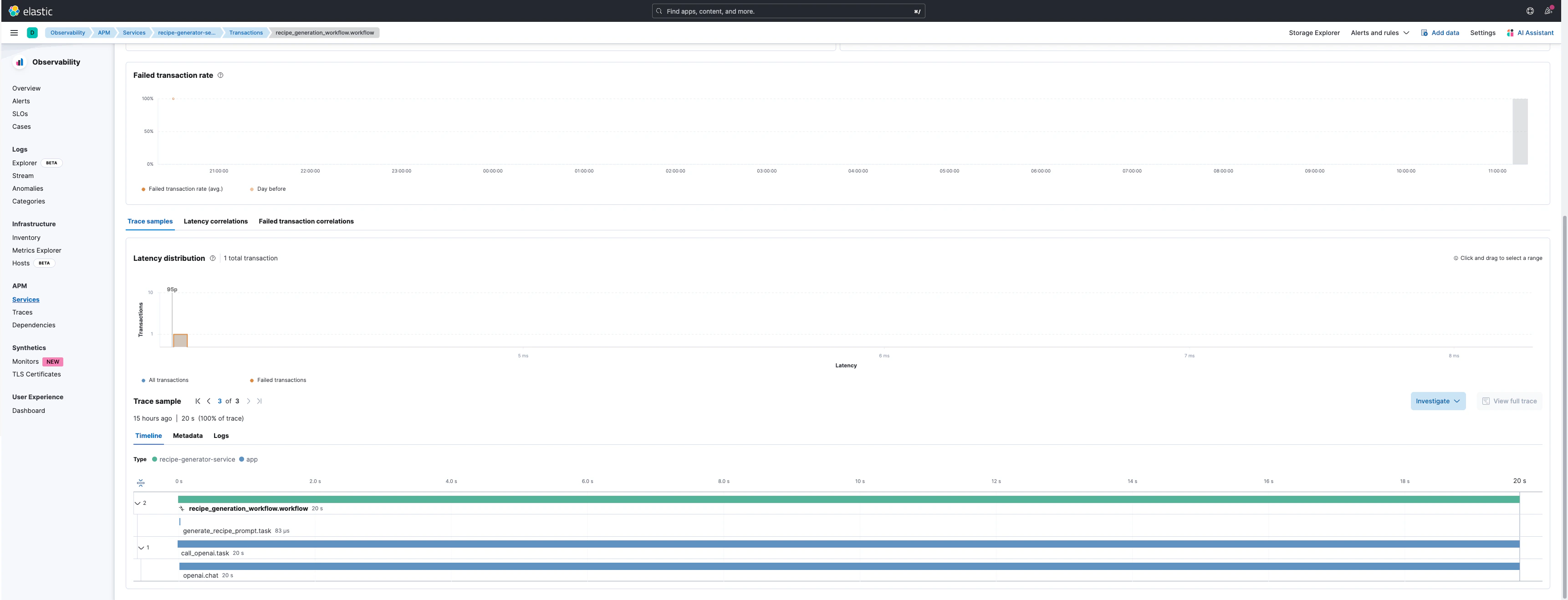
Trace Details
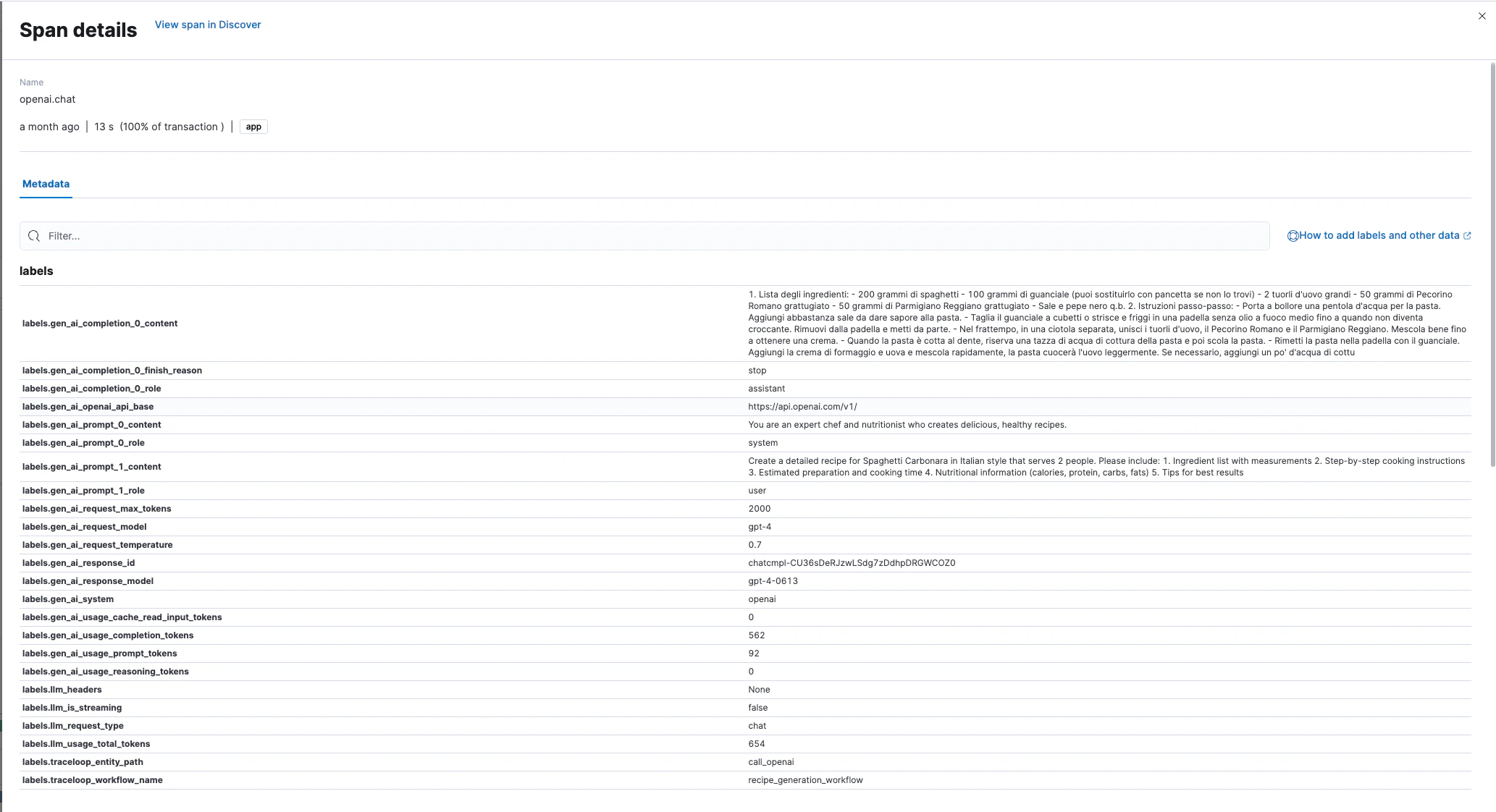
Captured Metadata

OpenLLMetry automatically captures these attributes in each LLM span: Request Attributes:
  • gen_ai.request.model - Model identifier
  • gen_ai.request.temperature - Sampling temperature
  • gen_ai.system - Provider name (OpenAI, Anthropic, etc.)
Response Attributes:
  • gen_ai.response.model - Actual model used
  • gen_ai.response.id - Unique response identifier
  • gen_ai.response.finish_reason - Completion reason
Token Usage:
  • gen_ai.usage.input_tokens - Input token count
  • gen_ai.usage.output_tokens - Output token count
  • llm.usage.total_tokens - Total tokens
Content (if enabled):
  • gen_ai.prompt.{N}.content - Prompt messages
  • gen_ai.completion.{N}.content - Generated completions

Production Considerations

Disable prompt/completion logging in production:
export TRACELOOP_TRACE_CONTENT=false
This prevents sensitive data from being stored in Elasticsearch.

Resources