> ## Documentation Index
> Fetch the complete documentation index at: https://www.traceloop.com/docs/llms.txt
> Use this file to discover all available pages before exploring further.
# Workflow Annotations
> Enrich your traces by annotating chains and workflows in your app
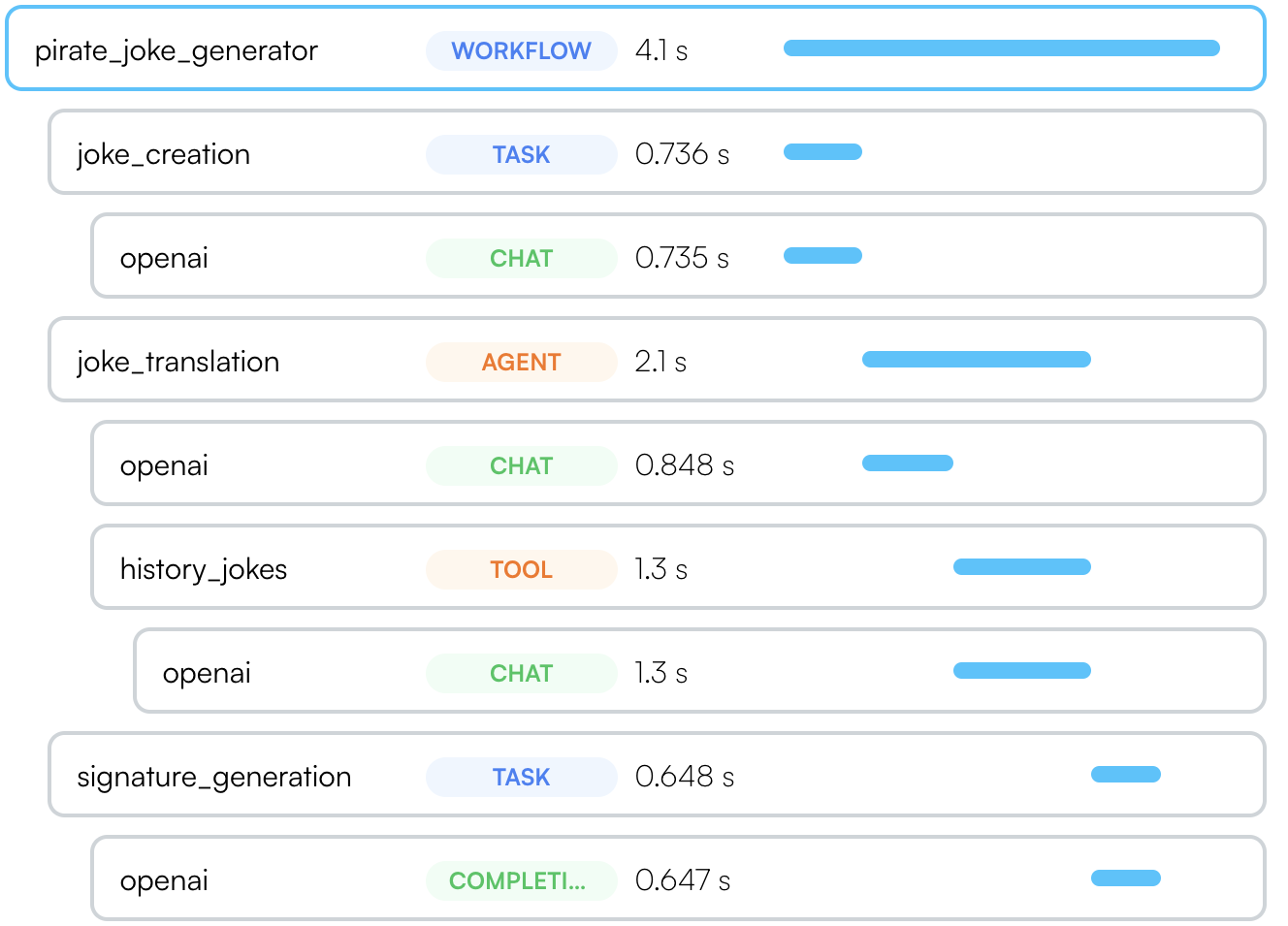
 Traceloop SDK supports several ways to annotate workflows, tasks, agents and tools in your code to get a more complete picture of your app structure.
If you're using a [supported LLM framework](/openllmetry/tracing/supported#frameworks) - no need
to do anything! OpenLLMetry will automatically detect the framework and
annotate your traces.
## Workflows and Tasks
Sometimes called a "chain", intended for a multi-step process that can be traced as a single unit.
Use it as `@workflow(name="my_workflow")` or `@task(name="my_task")`.
The `name` argument is optional. If you don't provide it, we will use the
function name as the workflow or task name.
You can version your workflows and tasks. Just provide the `version` argument
to the decorator: `@workflow(name="my_workflow", version=2)`
```python theme={null}
from openai import OpenAI
from traceloop.sdk.decorators import workflow, task
client = OpenAI(api_key=os.environ["OPENAI_API_KEY"])
@task(name="joke_creation")
def create_joke():
completion = client.chat.completions.create(
model="gpt-3.5-turbo",
messages=[{"role": "user", "content": "Tell me a joke about opentelemetry"}],
)
return completion.choices[0].message.content
@task(name="signature_generation")
def generate_signature(joke: str):
completion = openai.Completion.create(
model="davinci-002",[]
prompt="add a signature to the joke:\n\n" + joke,
)
return completion.choices[0].text
@workflow(name="pirate_joke_generator")
def joke_workflow():
eng_joke = create_joke()
pirate_joke = translate_joke_to_pirate(eng_joke)
signature = generate_signature(pirate_joke)
print(pirate_joke + "\n\n" + signature)
```
This feature is only available in Typescript. Unless you're on Nest.js, you'll need to update your `tsconfig.json` to enable decorators.
Update `tsconfig.json` to enable decorators:
```json theme={null}
{
"compilerOptions": {
"experimentalDecorators": true
}
}
```
Use it in your code `@traceloop.workflow({ name: "my_workflow" })`.
You can provide the parameters to the decorator directly or by providing a function that resolves to the parameters.
The function will be called with the `this` parameter and the arguments of the decorated function
(see [example](https://github.com/traceloop/openllmetry-js/blob/2178f1c5161218ffc7938bfe17fc1ced8190357c/packages/sample-app/src/sample_decorators.ts#L26)).
The name is optional. If you don't provide it, we will use the function
qualified name as the workflow or task name.
```js theme={null}
import * as traceloop from "@traceloop/node-server-sdk";
class JokeCreation {
@traceloop.task({ name: "joke_creation" })
async create_joke() {
completion = await openai.chat.completions({
model: "gpt-3.5-turbo",
messages: [
{ role: "user", content: "Tell me a joke about opentelemetry" },
],
});
return completion.choices[0].message.content;
}
@traceloop.task({ name: "signature_generation" })
async generate_signature(joke: string) {
completion = await openai.completions.create({
model: "davinci-002",
prompt: "add a signature to the joke:\n\n" + joke,
});
return completion.choices[0].text;
}
@traceloop.workflow({ name: "pirate_joke_generator" })
async joke_workflow() {
eng_joke = create_joke();
pirate_joke = await translate_joke_to_pirate(eng_joke);
signature = await generate_signature(pirate_joke);
console.log(pirate_joke + "\n\n" + signature);
}
}
```
Use it as `withWorkflow("my_workflow", {}, () => ...)` or `withTask(name="my_task", () => ...)`.
The function passed to `withWorkflow` or `withTask` witll be part of the workflow or task and can be async or sync.
```js theme={null}
import * as traceloop from "@traceloop/node-server-sdk";
async function create_joke() {
return await traceloop.withTask({ name: "joke_creation" }, async () => {
completion = await openai.chat.completions({
model: "gpt-3.5-turbo",
messages: [
{ role: "user", content: "Tell me a joke about opentelemetry" },
],
});
return completion.choices[0].message.content;
});
}
async function generate_signature(joke: string) {
return await traceloop.withTask(
{ name: "signature_generation" },
async () => {
completion = await openai.completions.create({
model: "davinci-002",
prompt: "add a signature to the joke:\n\n" + joke,
});
return completion.choices[0].text;
}
);
}
async function joke_workflow() {
return await traceloop.withWorkflow(
{ name: "pirate_joke_generator" },
async () => {
eng_joke = create_joke();
pirate_joke = await translate_joke_to_pirate(eng_joke);
signature = await generate_signature(pirate_joke);
console.log(pirate_joke + "\n\n" + signature);
}
);
}
```
## Agents and Tools
Similarily, if you use autonomous agents, you can use the `@agent` decorator to trace them as a single unit.
Each tool should be marked with `@tool`.
```python theme={null}
from openai import OpenAI
from traceloop.sdk.decorators import agent, tool
client = OpenAI(api_key=os.environ["OPENAI_API_KEY"])
@agent(name="joke_translation")
def translate_joke_to_pirate(joke: str):
completion = client.chat.completions.create(
model="gpt-3.5-turbo",
messages=[{"role": "user", "content": f"Translate the below joke to pirate-like english:\n\n{joke}"}],
)
history_jokes_tool()
return completion.choices[0].message.content
@tool(name="history_jokes")
def history_jokes_tool():
completion = client.chat.completions.create(
model="gpt-3.5-turbo",
messages=[{"role": "user", "content": f"get some history jokes"}],
)
return completion.choices[0].message.content
```
Similarily, if you use autonomous agents, you can use the `@agent` decorator to trace them as a single unit.
Each tool should be marked with `@tool`.
If you're not on Nest.js, remember to set `experimentalDecorators` to `true` in your `tsconfig.json`.
```js theme={null}
import * as traceloop from "@traceloop/node-server-sdk";
class Agent {
@traceloop.agent({ name: "joke_translation" })
async translate_joke_to_pirate(joke: str) {
completion = await openai.chat.completions.create({
model="gpt-3.5-turbo",
messages=[{"role": "user", "content": f"Translate the below joke to pirate-like english:\n\n{joke}"}],
});
history_jokes_tool();
return completion.choices[0].message.content;
}
@traceloop.tool({ name: "history_jokes" })
async history_jokes_tool() {
completion = await openai.chat.completions.create({
model="gpt-3.5-turbo",
messages=[{"role": "user", "content": f"get some history jokes"}],
});
return completion.choices[0].message.content;
}
```
Similarily, if you use autonomous agents, you can use the `withAgent` to trace them as a single unit.
Each tool should be in `withTool`.
```js theme={null}
import * as traceloop from "@traceloop/node-server-sdk";
async function translate_joke_to_pirate(joke: str) {
return await withAgent({name: "joke_translation" }, () => {
completion = await openai.chat.completions.create({
model="gpt-3.5-turbo",
messages=[{"role": "user", "content": f"Translate the below joke to pirate-like english:\n\n{joke}"}],
});
history_jokes_tool();
return completion.choices[0].message.content;
}
}
async function history_jokes_tool() {
return await withTool({ name: "history_jokes" }, () => {
completion = await openai.chat.completions.create({
model="gpt-3.5-turbo",
messages=[{"role": "user", "content": f"get some history jokes"}],
});
return completion.choices[0].message.content;
}
}
```
## Async methods
In Typescript, you can use the same syntax for async methods.
In python, the decorators work seamlessly with both synchronous and asynchronous functions.
Use `@workflow`, `@task`, `@agent`, and so forth for both sync and async methods.
The async-specific decorators (`@aworkflow`, `@atask`, etc.) are deprecated and will be removed in a future version.
See also a [separate section on using threads in Python with OpenLLMetry](/openllmetry/tracing/python-threads).
## Decorating Classes (Python only)
While the examples above shows how to decorate functions, you can also decorate classes.
In this case, you will also need to provide the name of the method that runs the workflow, task, agent or tool.
```python Python theme={null}
from openai import OpenAI
from traceloop.sdk.decorators import agent
client = OpenAI(api_key=os.environ["OPENAI_API_KEY"])
@agent(name="base_joke_generator", method_name="generate_joke")
class JokeAgent:
def generate_joke(self):
completion = client.chat.completions.create(
model="gpt-3.5-turbo",
messages=[{"role": "user", "content": "Tell me a joke about Traceloop"}],
)
return completion.choices[0].message.content
```
```
```
Traceloop SDK supports several ways to annotate workflows, tasks, agents and tools in your code to get a more complete picture of your app structure.
If you're using a [supported LLM framework](/openllmetry/tracing/supported#frameworks) - no need
to do anything! OpenLLMetry will automatically detect the framework and
annotate your traces.
## Workflows and Tasks
Sometimes called a "chain", intended for a multi-step process that can be traced as a single unit.
Use it as `@workflow(name="my_workflow")` or `@task(name="my_task")`.
The `name` argument is optional. If you don't provide it, we will use the
function name as the workflow or task name.
You can version your workflows and tasks. Just provide the `version` argument
to the decorator: `@workflow(name="my_workflow", version=2)`
```python theme={null}
from openai import OpenAI
from traceloop.sdk.decorators import workflow, task
client = OpenAI(api_key=os.environ["OPENAI_API_KEY"])
@task(name="joke_creation")
def create_joke():
completion = client.chat.completions.create(
model="gpt-3.5-turbo",
messages=[{"role": "user", "content": "Tell me a joke about opentelemetry"}],
)
return completion.choices[0].message.content
@task(name="signature_generation")
def generate_signature(joke: str):
completion = openai.Completion.create(
model="davinci-002",[]
prompt="add a signature to the joke:\n\n" + joke,
)
return completion.choices[0].text
@workflow(name="pirate_joke_generator")
def joke_workflow():
eng_joke = create_joke()
pirate_joke = translate_joke_to_pirate(eng_joke)
signature = generate_signature(pirate_joke)
print(pirate_joke + "\n\n" + signature)
```
This feature is only available in Typescript. Unless you're on Nest.js, you'll need to update your `tsconfig.json` to enable decorators.
Update `tsconfig.json` to enable decorators:
```json theme={null}
{
"compilerOptions": {
"experimentalDecorators": true
}
}
```
Use it in your code `@traceloop.workflow({ name: "my_workflow" })`.
You can provide the parameters to the decorator directly or by providing a function that resolves to the parameters.
The function will be called with the `this` parameter and the arguments of the decorated function
(see [example](https://github.com/traceloop/openllmetry-js/blob/2178f1c5161218ffc7938bfe17fc1ced8190357c/packages/sample-app/src/sample_decorators.ts#L26)).
The name is optional. If you don't provide it, we will use the function
qualified name as the workflow or task name.
```js theme={null}
import * as traceloop from "@traceloop/node-server-sdk";
class JokeCreation {
@traceloop.task({ name: "joke_creation" })
async create_joke() {
completion = await openai.chat.completions({
model: "gpt-3.5-turbo",
messages: [
{ role: "user", content: "Tell me a joke about opentelemetry" },
],
});
return completion.choices[0].message.content;
}
@traceloop.task({ name: "signature_generation" })
async generate_signature(joke: string) {
completion = await openai.completions.create({
model: "davinci-002",
prompt: "add a signature to the joke:\n\n" + joke,
});
return completion.choices[0].text;
}
@traceloop.workflow({ name: "pirate_joke_generator" })
async joke_workflow() {
eng_joke = create_joke();
pirate_joke = await translate_joke_to_pirate(eng_joke);
signature = await generate_signature(pirate_joke);
console.log(pirate_joke + "\n\n" + signature);
}
}
```
Use it as `withWorkflow("my_workflow", {}, () => ...)` or `withTask(name="my_task", () => ...)`.
The function passed to `withWorkflow` or `withTask` witll be part of the workflow or task and can be async or sync.
```js theme={null}
import * as traceloop from "@traceloop/node-server-sdk";
async function create_joke() {
return await traceloop.withTask({ name: "joke_creation" }, async () => {
completion = await openai.chat.completions({
model: "gpt-3.5-turbo",
messages: [
{ role: "user", content: "Tell me a joke about opentelemetry" },
],
});
return completion.choices[0].message.content;
});
}
async function generate_signature(joke: string) {
return await traceloop.withTask(
{ name: "signature_generation" },
async () => {
completion = await openai.completions.create({
model: "davinci-002",
prompt: "add a signature to the joke:\n\n" + joke,
});
return completion.choices[0].text;
}
);
}
async function joke_workflow() {
return await traceloop.withWorkflow(
{ name: "pirate_joke_generator" },
async () => {
eng_joke = create_joke();
pirate_joke = await translate_joke_to_pirate(eng_joke);
signature = await generate_signature(pirate_joke);
console.log(pirate_joke + "\n\n" + signature);
}
);
}
```
## Agents and Tools
Similarily, if you use autonomous agents, you can use the `@agent` decorator to trace them as a single unit.
Each tool should be marked with `@tool`.
```python theme={null}
from openai import OpenAI
from traceloop.sdk.decorators import agent, tool
client = OpenAI(api_key=os.environ["OPENAI_API_KEY"])
@agent(name="joke_translation")
def translate_joke_to_pirate(joke: str):
completion = client.chat.completions.create(
model="gpt-3.5-turbo",
messages=[{"role": "user", "content": f"Translate the below joke to pirate-like english:\n\n{joke}"}],
)
history_jokes_tool()
return completion.choices[0].message.content
@tool(name="history_jokes")
def history_jokes_tool():
completion = client.chat.completions.create(
model="gpt-3.5-turbo",
messages=[{"role": "user", "content": f"get some history jokes"}],
)
return completion.choices[0].message.content
```
Similarily, if you use autonomous agents, you can use the `@agent` decorator to trace them as a single unit.
Each tool should be marked with `@tool`.
If you're not on Nest.js, remember to set `experimentalDecorators` to `true` in your `tsconfig.json`.
```js theme={null}
import * as traceloop from "@traceloop/node-server-sdk";
class Agent {
@traceloop.agent({ name: "joke_translation" })
async translate_joke_to_pirate(joke: str) {
completion = await openai.chat.completions.create({
model="gpt-3.5-turbo",
messages=[{"role": "user", "content": f"Translate the below joke to pirate-like english:\n\n{joke}"}],
});
history_jokes_tool();
return completion.choices[0].message.content;
}
@traceloop.tool({ name: "history_jokes" })
async history_jokes_tool() {
completion = await openai.chat.completions.create({
model="gpt-3.5-turbo",
messages=[{"role": "user", "content": f"get some history jokes"}],
});
return completion.choices[0].message.content;
}
```
Similarily, if you use autonomous agents, you can use the `withAgent` to trace them as a single unit.
Each tool should be in `withTool`.
```js theme={null}
import * as traceloop from "@traceloop/node-server-sdk";
async function translate_joke_to_pirate(joke: str) {
return await withAgent({name: "joke_translation" }, () => {
completion = await openai.chat.completions.create({
model="gpt-3.5-turbo",
messages=[{"role": "user", "content": f"Translate the below joke to pirate-like english:\n\n{joke}"}],
});
history_jokes_tool();
return completion.choices[0].message.content;
}
}
async function history_jokes_tool() {
return await withTool({ name: "history_jokes" }, () => {
completion = await openai.chat.completions.create({
model="gpt-3.5-turbo",
messages=[{"role": "user", "content": f"get some history jokes"}],
});
return completion.choices[0].message.content;
}
}
```
## Async methods
In Typescript, you can use the same syntax for async methods.
In python, the decorators work seamlessly with both synchronous and asynchronous functions.
Use `@workflow`, `@task`, `@agent`, and so forth for both sync and async methods.
The async-specific decorators (`@aworkflow`, `@atask`, etc.) are deprecated and will be removed in a future version.
See also a [separate section on using threads in Python with OpenLLMetry](/openllmetry/tracing/python-threads).
## Decorating Classes (Python only)
While the examples above shows how to decorate functions, you can also decorate classes.
In this case, you will also need to provide the name of the method that runs the workflow, task, agent or tool.
```python Python theme={null}
from openai import OpenAI
from traceloop.sdk.decorators import agent
client = OpenAI(api_key=os.environ["OPENAI_API_KEY"])
@agent(name="base_joke_generator", method_name="generate_joke")
class JokeAgent:
def generate_joke(self):
completion = client.chat.completions.create(
model="gpt-3.5-turbo",
messages=[{"role": "user", "content": "Tell me a joke about Traceloop"}],
)
return completion.choices[0].message.content
```
```
```